domingo, 5 de marzo de 2017

8th practice – SHORT FILM WITH MOVIE MAKER


PRESENTATION

In this practice we are going to record and edit a short film using the program Movie Maker. There are more powerful programs that can be used for this purpose – making a film - but they are not free.

Movie Maker is quite limited editing sounds and music. So you can use Audacity to record and modify the voices, add music, effects… Here I have included you a video about how to use Movie Maker.


As a general rule, all the scenes will be recorded in your free time with your mobile phones. I am going to give you an authorization that your parents will have to sign. Without this authorization signed you cannot bring the mobile phone to the School and you cannot record any scene in which your faces appear.

The editing process of the music and the images will take place during the classes.

You cannot use music or sounds under author rights because is illegal. However, you can search for free music in the Internet. There are some free music banks such as the ones listed below:


INSTRUCTIONS

Some instructions to improve the results of your work:

  • Write a script of the story even if it is a silent movie. You need to know what to record and the order of the scenes you are going to edit during the class.
  • Record the images and the sounds with different phones. The phone recording the voices has to be near the characters in order to avoid disturbing noises.
  • Use a clapperboard (or a strong slap) to synchronize with Movie Maker the sounds and the images.
  • Record some takes from different angles at the same time.
  • If you need to change the extension of your videos (from .mp4 to another format) you can use the VLC program installed in your computer.


GETTING IDEAS

Here you can find some interesting videos about how to record a powerful short film:

FILMS TECHNIQUES


5 TIPS FOR MAKING SHORT FILMS


TRICKS & TIPS: CAMERA ANGLES


I have also included some famous short films and the links to some festival WebPages where you could probably find some inspiration…


FESTIVALS OR COMPETITIONS FOR TEENAGERS

There are some festivals in which you can participate. I include the links to them below. There are more, but unfortunately we are out of date. Should you be interested in taking part in any of them, please, let me know as soon as possible so that we can process all the forms and requirements needed.


If you find about any other festivals and you are interested to take part in them, be so kind to inform me so that we can study the possibility of participating.

TOPICS

Anyway, whether you take part in a competition/festival or not, here you have the topics your short film has to be about:

  • Bullying.
  • Gender inequality and violence within the domestic and familiar environment.
  • Environment preservation and sustainability.
  • People trafficking.
  • Racism and migrant movements.
  • Corruption and how it affects to the countries' development and richness.

When all the videos will be finished we would watch them in the class. Although I haven’t mentioned it before, they have to be respectful with the rest of your classmates, teachers, people or animals. No offensive language is allowed. The reproduction or distribution of these materials outside the class it totally banned. The School will adopt disciplinary measures if you ignore these rules.


So let’s go and good luck!!!


lunes, 9 de enero de 2017

7th Practice: POWER POINT PRESENTATION


Hi students,

This practice we are going to work with POWER POINT. As I want you to be self-sufficient, I am including below some videos and tutorials where you can find information about how to use this program.

Brief tutorial
Power Point 2013 videos & tutorials

Microsoft Power Point step by step guide


In this practice you will have to create a Power Point presentation which has to deal with one of the next three topics:

  • Computing History.
  • Information Society (how the ICT are affecting our daily lives and the social organization, digital literacy, veracity of the information, deterioration of some human skills, globalization…).
  • Computing Safety (threats, antivirus, firewalls, Peer & Peer nets, privacy protection, social engineering…).


The minimum requirements the presentation has to fulfill are:

  • It has to contain a cover page and a slide with the contents and it has to be compound of no less than 30 slides and no more than 40.
  • It has to include two hyperlinks, two images with different shapes, a Smart Art diagram, a flow chart and a brief video related with the contents you are going to expose.
  • At least twenty slides have to contain personalized animations and you have to use different types of designs. Between the slides you have to apply transitions.
  • There has to be at least one group shapes.


In a next step, you will have to expound your topic to the class with the help of the presentation you have created. The talk should be in English and has to last more or less ten minutes.

Finally, you will have to publish your presentation in Slideshare so that everybody can use it. 


So, enjoy your practice!!!


martes, 20 de diciembre de 2016

Merry Christmas and a Happy New Year


Dear Students,

Your fantastic and great ICT teacher desires you a Merry Christmas and a  Happy New Year.

May the Magi bring you health and the wants to study hard to become wise people so that you can improve the World.

See you next year!


domingo, 11 de diciembre de 2016

6th practice. AUDACITY: Tell me your story

Hi dear students,

In this practice we are going to use the free software Audacity to edit audio files. You will find the program on your desktop.

First, I recommend you to visualize the videos included below so that you can start using this program.


For more information you can also consult the tutorials you will find in the next links.


So your work will consist on recording a traditional tale and then adding it music and sound effects. Its length has to be of at least 5 minutes and it has to include ten sound effects. So,please, surprise me!!!

Here you have some websites where you can find free sound effects.

Fxmania (in French)

You can use the Sound Recorder provided with Windows to record your voice telling the tale, but I think it's better for you to use the recorder included with Audacity to record your voice while telling the tale. You will also need a microphone, so ask me when needed.

When you finish your practice, be so kind to upload your file in Google Drive and share it with me. During the class you will also have to show me your Audacity project from time to time so that I can assess your work.

As always, if you have any problem editing your soundtrack, please ask me.


Important advertisement:

I am negotiating with the Entrepreneurship teacher, so that her students sell a CD of our best tales. A percentage of their income will be for us if they finally agree my proposal.

So, please, be careful about the pronunciation and try to do your best not only for the mark but also for the economic benefit you can obtain.


lunes, 21 de noviembre de 2016

5th practice. Excel: Sort&Filter, Find&Replace, mail merge.


Dear students,

I am glad to inform you that we are going to start our next practice.
So, please, be so kind to open the internet explorer and search in Google “Colegios públicos Excel”. Download the first file with an xls extension you find.
Next, open the file and save it with the name “TIC1/2a/b/c/…”.


After that, fulfill the following tasks:

1) Sort the data by these three criteria.


POST CODE
Smallest to largest
ACRONYM
A-Z
DENOMINATION
A-Z

 
2) Find “LA GOMERA” and replace with “LA GOMERA” shadowed in green color.


3) Create a dynamic table as shown in the image below.


4) Finally make a merge mail by using Word and Excel programs. I have included you a link to a Youtube video where you can learn easily how to do it.


To summarize, you have to follow the steps listed below:


a) Open the Word program and go to “Mailings”.

b) Click over “Start a merge mail”

c) Select a recipient and after that “Use an existing list” (use the Directorio sheet of your Excel document).

d) While writing your mail, when you need to insert a field, you have to click over “Insert merge fields”.

e) Once you have finish “Preview results”.

f) Finally click in “Finish and merge” and print the document using PDF Creator.


In the next image you can see the text you have to write and the fields needed to complete your work satisfactorily.


When you have finished the practice, please, upload in Google Drive your pdf and xls files and share them with me.

So good luck and take it easy!!!


lunes, 7 de noviembre de 2016

4 th practice: Excel Functions I


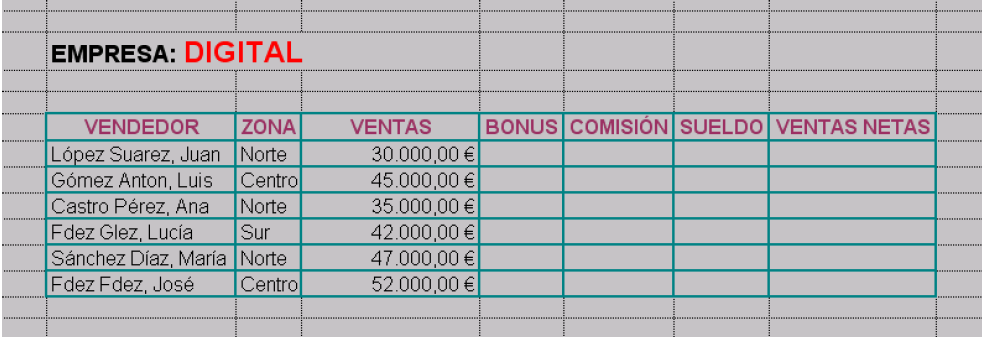
Digital company wants to make a statistic study of its sales force in Spain. The company has the information contained in the following table:


They also have a commissions table used to calculate commissions and bonus. The bands are the following ones:


So you will have to complete the tasks listed below:


1) Insert a title in red and Arial 12 letters. The title has to be the name of the company.

2) Improve the spreadsheet:

-  The letters of the column’s titles should be 12 green Comic sans.

-  Apply borders to the cells or even colors.

-  Apply currency format with two decimals to the sales column.

3) Calculate the commissions the sellers are going to obtain considering the bands established by the company.

4) Calculate the bonus the sellers are going to receive taking into account the bands of the table.

5) Obtain the total net sales of the company.

6) Calculate the salary of each employee.

The commissions and the bonus of each employee are difficult to calculate. So I recommend you to watch the video included for a clue and, if after all you don’t find the solution, ask me. I will be glad to help you. You will also need to use the tutorials included in the last practice.

So cheer up and don’t faint!